Restructuring credit card management to reduce friction and confusion
Restructuring credit card management to reduce friction and confusion
Restructuring credit card management to reduce friction and confusion
Restructuring credit card management to reduce friction and confusion
Restructuring credit card management to reduce friction and confusion
Fintech
Mobile app
Banking
Redesign
Fintech
Mobile app
Banking
Redesign


Overview
Rethinking the credit card experience for everyday clarity
Overview
Rethinking the credit card experience for everyday clarity
Overview
Rethinking the credit card experience for everyday clarity
I redesigned the credit card management experience: payments, transactions, shortcuts, and card settings. It's one of the most-used flows in the app, and one of the least understood.
As part of the client’s in-house design team, I worked closely with designers, product managers, and developers in the broader redesign of the mobile banking app. This study focuses on the credit card management scope within that larger redesign effort. The full app is still in progress.
Client name hidden for privacy and confidentiality reasons.
Overview
Rethinking the credit card experience for everyday clarity
I redesigned the credit card management experience: payments, transactions, shortcuts, and card settings. It's one of the most-used flows in the app, and one of the least understood.
As part of the client’s in-house design team, I worked closely with designers, product managers, and developers in the broader redesign of the mobile banking app. This study focuses on the credit card management scope within that larger redesign effort. The full app is still in progress.
Client name hidden for privacy and confidentiality reasons.
Work methodology
Work methodology
Work methodology
Agile (Scrum) : bi-weekly sprints, doing planning, refinement and reviews.
Timeframe
Timeframe
Feb - Mar 2025 (credit card management scope). Ongoing full app redesign since Dec 2024
Feb - Mar 2025 (credit card management scope). Ongoing full app redesign since Dec 2024
Team
Team
1 UX / UI Designer (my role)
1 Chapter Lead
1 UX Lead
3 Developers
1 Product Owner
1 Business Analyst
1 Tech Lead
1 Content Designer
Tools
Tools
Figma
ChatGPT
Miro
Dovetail
Notion
UXCam
Jira
Figma
ChatGPT
Miro
Dovetail
Notion
UXCam
Jira
Problem
Users struggled to locate key information and actions in a scattered, hard-to-scan interface
Problem
Users struggled to locate key information and actions in a scattered, hard-to-scan interface
Problem
Users struggled to locate key information and actions in a scattered, hard-to-scan interface
Hidden actions, inconsistent terminology, and weak visual hierarchy made the interface hard to scan. Users made errors, missed self-service options, and lost trust in the flow, impacting both user experience and operational efficiency.
Problem
Users struggled to locate key information and actions in a scattered, hard-to-scan interface
Hidden actions, inconsistent terminology, and weak visual hierarchy made the interface hard to scan. Users made errors, missed self-service options, and lost trust in the flow, impacting both user experience and operational efficiency.
Impact
Clearer experience, faster tasks, higher confidence
Impact
Clearer experience, faster tasks, higher confidence
Impact
Clearer experience, faster tasks, higher confidence
Usability testing confirmed the restructured flow worked by making card management easier to navigate: users found balance, due date, and key actions from the card home without navigating back or bouncing between menus.
Significantly reduced user confusion and time spent on key actions, minimized errors, and boosted confidence through improved feedback, well-structured hierarchy, and more understandable content.
This has made credit card management faster and easier to navigate, positioning the app for increased user satisfaction and operational efficiency.
Impact
Clearer experience, faster tasks, higher confidence
Usability testing confirmed the restructured flow worked by making card management easier to navigate: users found balance, due date, and key actions from the card home without navigating back or bouncing between menus.
Project goals
Project goals
Functional
Functional
Functional
Simplify dense information, clarify terminology, and restructure key flows to make card-related data easier to understand, accelerate task completion, and reduce friction.
Visual
Visual
Visual
Improve visual consistency and hierarchy with a new scalable and flexible design system.
Business
Business
Business
Enhance self-service capabilities, reduce support queries, and boost user satisfaction.
Functional
Simplify dense information, clarify terminology, and restructure key flows to make card-related data easier to understand, accelerate task completion, and reduce friction.
Visual
Improve visual consistency and hierarchy with a new scalable and flexible design system.
Business
Enhance self-service capabilities, reduce support queries, and boost user satisfaction.
Constraints
Constraints
Constraints
Design system: We build the design system and the screens in parallel. That meant revisiting flows every time a foundational component shifted. Progress slowed until core decisions were made.
Design system: The design system and the screens were built in parallel, which meant revisiting flows each time a foundational component changed.
Design system: We build the design system and the screens in parallel. That meant revisiting flows every time a foundational component shifted. Progress slowed until core decisions were made.
Business: Priorities sometimes conflicted with user needs. Requests like “stop debit” were deprioritized due to internal limits, so we preserved access to key tasks within those constraints.
Business: Some features users needed, like "stop debit", were deprioritized for internal reasons, not UX ones.
Business: Priorities sometimes conflicted with user needs. Requests like “stop debit” were deprioritized due to internal limits, so we preserved access to key tasks within those constraints.
Sneak peek of the final design!
Sneak peek of the final design!
Sneak peek of the final design!


Screenshots of the new design
Screenshots of the new design
Screenshots of the new design
UX Analysis
What wasn’t working and why
UX Analysis
What wasn’t working and why
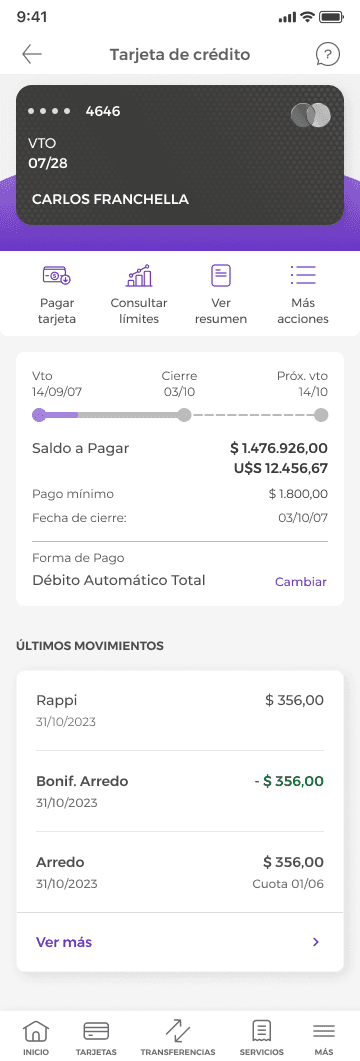
Users struggled to find key features, including card management options and real-time details like balances, recent transactions, and upcoming due dates. These needs vary by billing cycle but weren’t reflected in the interface. More than visual tweaks were needed. The experience required restructuring how information flows.
I mapped the identified issues against established usability heuristics, and categorized patterns like hidden actions, flattened hierarchy, and inconsistent labelling.
UX Analysis
What wasn’t working and why
Users found it challenging to locate key functionalities, including card management options and real-time details, such as current balance, recent transactions, and upcoming due dates, which vary in importance depending on their billing cycle.
These insights revealed that the solution required more than visual changes; it demanded a fundamental restructuring of how information flows through the user journey.
1
2
3
4
5
6
1
Essential management features weren’t logically grouped, making basic actions, such as viewing card details or adjusting payment methods, harder to find.
2
Similar text styles for different information types flattened hierarchy and reduced scannability.
3
No information is provided on the amount spent so far, limiting users’ ability to track their consumption within the current billing period.
4

5
The interface lacked flexibility across the billing cycle, despite shifting user priorities.
6
Information overload increased cognitive load and mistakes. Eg: There are two different “more actions” menus.

1
2
1
The home screen didn’t surface key card details, forcing users to dig deeper for essential information.
2
The intermediate card selection screen added friction without showing balance, due date, or limits. This slowed access to key information, reducing task efficiency.
The home screen didn’t surface key card details, forcing users to dig deeper for essential information.
1
2
The intermediate card selection screen added friction without showing balance, due date, or limits. This slowed access to key information, reducing task efficiency.
The home screen didn’t surface key card details, forcing users to dig deeper for essential information.
1
2
The intermediate card selection screen added friction without showing balance, due date, or limits. This slowed access to key information, reducing task efficiency.
1
2
1
The home screen didn’t surface key card details, forcing users to dig deeper for essential information.
2
The intermediate card selection screen added friction without showing balance, due date, or limits. This slowed access to key information, reducing task efficiency.
Information overload increased cognitive load and mistakes. Eg: There are two different “more actions” menus.
The interface lacked flexibility across the billing cycle, despite shifting user priorities.
No information is provided on the amount spent so far, limiting users’ ability to track their consumption within the current billing period.
Similar text styles for different information types flattened hierarchy and reduced scannability.
Essential management features weren’t logically grouped, making basic actions, such as viewing card details or adjusting payment methods, harder to find.
1
2
3
4
5
6
Information overload increased cognitive load and mistakes. Eg: There are two different “more actions” menus.
The interface lacked flexibility across the billing cycle, despite shifting user priorities.
No information is provided on the amount spent so far, limiting users’ ability to track their consumption within the current billing period.
Similar text styles for different information types flattened hierarchy and reduced scannability.
Essential management features weren’t logically grouped, making basic actions, such as viewing card details or adjusting payment methods, harder to find.
1
2
3
4
5
6
1
2
3
4
5
6
1
Essential management features weren’t logically grouped, making basic actions, such as viewing card details or adjusting payment methods, harder to find.
2
Similar text styles for different information types flattened hierarchy and reduced scannability.
3
No information is provided on the amount spent so far, limiting users’ ability to track their consumption within the current billing period.
4
5
The interface lacked flexibility across the billing cycle, despite shifting user priorities.
6
Information overload increased cognitive load and mistakes. Eg: There are two different “more actions” menus.
Users
Two user profiles, one unified experience
Users
Two user profiles, one unified experience
Users
Two user profiles, one unified experience

German, 32 years
Frequent user
Frequent user
Frequent user
German relies on his card daily and tracks spending closely to maximize points and cashback. He expects real-time access to balances, transactions, and benefits.
German relies on his card daily and tracks spending closely to maximize points and cashback. He expects real-time access to balances, transactions, and benefits.
German relies on his card daily and tracks spending closely to maximize points and cashback. He expects real-time access to balances, transactions, and benefits.

Martín, 43 years
Strategic user
Strategic user
Strategic user
Martín plans purchases around discounts and benefits. He uses the card selectively and expects the app to surface relevant offers at the right moment.
Martín plans purchases around discounts and benefits. He uses the card selectively and expects the app to surface relevant offers at the right moment.
Martín plans purchases around discounts and benefits. He uses the card selectively and expects the app to surface relevant offers at the right moment.
Discovery
Lessons from 20 digital and traditional banking apps
Discovery
Lessons from 20 digital and traditional banking apps
Discovery
Lessons from 20 digital and traditional banking apps
Discovery
Lessons from 20 digital and traditional banking apps
I organized and synthesize findings, using ChatGPT, across all 20, surfacing structural patterns faster than manual tagging alone. The strongest experiences shared five things:
• Clearly group related functionalities
• Use consistent, simple language
• Prioritize quick access to frequent actions
• Balance amount due and recent activity
• Use shortcuts, collapsible menus, and tabs to surface key actions
Because users rely on both types of banking apps, the credit card experience needed to feel intuitive and familiar across profiles.
I did an audit of 20 digital and traditional banking applications and learnt that the best experiences:
Grouped related functionalities clearly
Used consistent and simple language
Prioritized quick access to frequent actions
Balance the display of the amount due and recent activity
Shortcuts, collapsible menus, and tabs are used to help users access details and actions quickly
Since most of our users actively rely on both both type of banking applications, it was essential to design a credit card experience that felt intuitive and familiar to both user profiles.
Screenshots and patterns from banking apps

Limits, available balance, upcoming due dates, recent purchases, and configuration options are displayed at the same menu level.

The available limit is prioritized over the amount due, aligning with a moment in the billing cycle when the user has already paid their balance and is more focused on their spending capacity.

The information displayed on the cards updates based on the billing cycle. First, it shows the total amount of purchases + limits. After the closing date, it shows the amount due and its due date.

The card home displays a carousel where selecting a different card updates the information shown below.

Card details are shown in a sheet.


Traditional banking apps tend to prioritize the amount due and due date, especially when there’s a dedicated card section on the home screen. There are cases where the transaction history is prioritized within the card detail view.

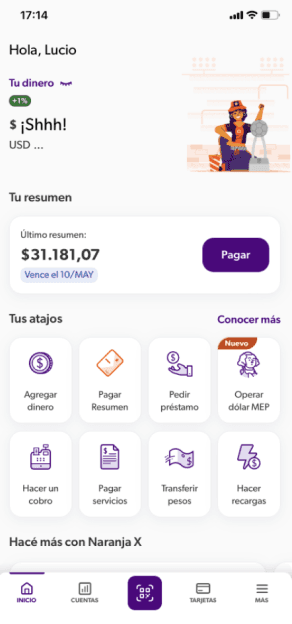

Digital banks and wallets promote interactivity, speed, and adaptability to support quick decision-making while traditional banks lean toward more static summaries.


Menus, tabs, chips and shortcuts to simplify navigation and reduce user effort.
Limits, available balance, upcoming due dates, recent purchases, and configuration options are displayed at the same menu level.
The available limit is prioritized over the amount due, aligning with a moment in the billing cycle when the user has already paid their balance and is more focused on their spending capacity.
The information displayed on the cards updates based on the billing cycle. First, it shows the total amount of purchases + limits. After the closing date, it shows the amount due and its due date.
The card home displays a carousel where selecting a different card updates the information shown below.
Card details are shown in a sheet.
Traditional banking apps tend to prioritize the amount due and due date, especially when there’s a dedicated card section on the home screen. There are cases where the transaction history is prioritized within the card detail view.
Digital banks and wallets promote interactivity, speed, and adaptability to support quick decision-making while traditional banks lean toward more static summaries.
Menus, tabs, chips and shortcuts to simplify navigation and reduce user effort.
Limits, available balance, upcoming due dates, recent purchases, and configuration options are displayed at the same menu level.
The available limit is prioritized over the amount due, aligning with a moment in the billing cycle when the user has already paid their balance and is more focused on their spending capacity.
The information displayed on the cards updates based on the billing cycle. First, it shows the total amount of purchases + limits. After the closing date, it shows the amount due and its due date.
The card home displays a carousel where selecting a different card updates the information shown below.
Card details are shown in a sheet.
Traditional banking apps tend to prioritize the amount due and due date, especially when there’s a dedicated card section on the home screen. There are cases where the transaction history is prioritized within the card detail view.
Digital banks and wallets promote interactivity, speed, and adaptability to support quick decision-making while traditional banks lean toward more static summaries.
Menus, tabs, chips and shortcuts to simplify navigation and reduce user effort.
Limits, available balance, due dates, recent purchases, and configuration options appear at the same menu level, flattening hierarchy and reducing clarity.
The available limit is prioritized over the amount due, aligning with a moment in the billing cycle when the user has already paid their balance and is more focused on their spending capacity.
Card information adapts to the billing cycle. Before closing, it highlights total purchases and limits. After closing, it prioritizes the amount due and due date.
A card carousel updates the information below when a different card is selected.
Card details are displayed in a sheet.
Traditional banking apps often prioritize amount due and due date, especially when a card section exists on the home screen. In some cases, transaction history takes priority within the card detail view.
Digital banks and wallets emphasize interactivity, speed, and adaptability to support quicker decisions, while traditional banks rely more on static summaries.
Menus, tabs, chips, and shortcuts help surface key actions and reduce navigation effort.
Screenshots and patterns from banking apps
Screenshots and patterns from banking apps
Screenshots and patterns from banking apps
Secondary Research
Understanding the current experience
Secondary Research
Understanding the current experience
Secondary Research
Understanding the current experience
Across prior interviews in Dovetail and UXCam sessions, the same friction points reappeared: back-and-forth navigation, missed actions, and drop-offs at decision points. This shaped what to prioritize in the survey.


Recurring improvement areas surfaced in user interviews
Recurring improvement areas surfaced in user interviews
Recurring improvement areas surfaced in user interviews
Recurring improvement areas surfaced in user interviews
Show recent transactions
Show recent transactions
Show recent transactions
Show recent transactions
Provide access to all card details (number, security code)
Provide access to all card details (number, security code)
Provide access to all card details (number, security code)
Provide access to all card details (number, security code)
Highlight available benefits and promotions
Highlight available benefits and promotions
Highlight available benefits and promotions
Highlight available benefits and promotions
Notifications (transactions, due date / payment reminders)
Notifications (transactions, due date / payment reminders)
Notifications (transactions, due date / payment reminders)
Notifications (transactions, due date / payment reminders)
Surface key credit card data on the home screen (total spending, statement closing date, due date)
Surface key credit card data on the home screen (total spending, statement closing date, due date)
Surface key credit card data on the home screen (total spending, statement closing date, due date)
Surface key credit card data on the home screen (total spending, statement closing date, due date)
Research
Hearing from the source: what I learnt from 23 user surveys
Research
Hearing from the source: what I learnt from 23 user surveys
Research
Hearing from the source: what I learnt from 23 user surveys
Research
Hearing from the source: what I learnt from 23 user surveys
Across methods, the same friction points were linked to a structural issue.
I used ChatGPT to cluster responses and detect repeated patterns across them. It helped me synthesize data faster and structure findings clearly before presenting them to stakeholders.
Key financial data had to be immediate
Key financial data had to be immediate
Key financial data had to be immediate
Users expected real-time balances and due dates upfront according to their billing cycle.
Users expected real-time balances and due dates upfront according to their billing cycle.
users expected real-time balances and due dates upfront.
Users expected real-time balances and due dates upfront according to their billing cycle.
Visual overload caused confusion
Visual overload caused confusion
Visual overload caused confusion
Similar typographic weights, unclear labels and dense information blocks increased cognitive fatigue.
Similar typographic weights, unclear labels and dense information blocks increased cognitive fatigue.
Similar typographic weights, unclear labels and dense blocks increased fatigue.
Similar typographic weights, unclear labels and dense information blocks increased cognitive fatigue.
Notifications were useful when relevant
Notifications were useful when relevant
Notifications were useful when relevant
Alerts around limits, billing cycles, and unusual activity were valued.
Alerts around limits, billing cycles, and unusual activity were valued.
Alerts around limits, billing cycles, and unusual activity were valued.
Benefits were undervalued due to poor visibility
Benefits were undervalued due to poor visibility
Benefits were undervalued due to poor visibility
Many users reported not finding, or forgetting about, available benefits.
Many users reported not finding, or forgetting about, available benefits.
Several users reported not finding, or forgetting about, available benefits.
Many users reported not finding, or forgetting about, available benefits.
Navigation was a frequent source of friction
Navigation was a frequent source of friction
Navigation was a frequent source of friction
Navigation was a frequent source of friction
Users struggled to find basic management options such as adjusting payment methods or reporting a lost card.
Users struggled to find basic management options such as adjusting payment methods or reporting a lost card.
Users struggled to find basic management options such as adjusting payment methods.
Users struggled to find basic management options such as adjusting payment methods or reporting a lost card.


¿Cuáles son las principales motivaciones para empezar a usar nuestra tarjeta de crédito?


Survey results highlighting user pain points and preferences
Survey results highlighting user pain points and preferences
Survey results highlighting user pain points and preferences
Survey results highlighting user pain points and preferences
Main Challenge
Turning scattered data into a coherent experience by showing what matters when it matters
Main Challenge
Turning scattered data into a coherent experience by showing what matters when it matters
Main Challenge
Turning scattered data into a coherent experience by showing what matters when it matters
Users' priorities shifted across the billing cycle, but the interface didn't, so the solution required a structural change.
Users' priorities shifted across the billing cycle, but the interface didn't, so the solution required a structural change.
Users' priorities shifted across the billing cycle, but the interface didn't, so the solution required a structural change.
Main Challenge
Turning scattered data into a coherent experience by showing what matters when it matters
Users' priorities shifted across the billing cycle, but the interface didn't, so the solution required a structural change.
Ideation
Laying the groundwork for intuitive navigation
Ideation
Laying the groundwork for intuitive navigation
Ideation
Laying the groundwork for intuitive navigation
Ideation
Laying the groundwork for intuitive navigation
I mapped a revised information architecture, regrouping key actions like payments, settings and statements under a clearer structure. Then I built a mid-fidelity prototype to test navigation patterns with users.


First sketch
First sketch
Ready for user testing
Ready for user testing
Ready for user testing
First sketch
Findings
Testing results revealed that participants found actions faster and read the hierarchy more accurately
Findings
Testing results revealed that participants found actions faster and read the hierarchy more accurately
Findings
Testing results revealed that participants found actions faster and read the hierarchy more accurately
I rapidly organized and distilled insights from the 5 interviews, reducing analysis time while preserving depth and nuance, using ChatGPT as part of my workflow.
What worked well
What worked well
What worked well
Real-time info, right when needed
Real-time info, right when needed
Users felt more confident with the new layout, which
surfaced key financial data based on their billing cycle.
Showing pending amounts, due dates, and payment methods upfront helped them act quickly and adjust to shifting priorities.

Real-time info, right when needed
Users felt more confident with the new layout, which
surfaced key financial data based on their billing cycle.
Showing pending amounts, due dates, and payment methods upfront helped them act quickly and adjust to shifting priorities.


Designed for action
Designed for action
The layout made it easier to act on statements by placing payment and summary options in visible areas.
Aligning elements with users’ mental model (“I see what I owe → I pay”) made actions more intuitive and immediate.
Designed for action
The layout made it easier to act on statements by placing payment and summary options in visible areas.
Aligning elements with users’ mental model (“I see what I owe → I pay”) made actions more intuitive and immediate.
Smarter grouping, fewer distractions
Smarter grouping, fewer distractions
Instead of navigating across sections, users could access all card-related settings in one place. The new structure reduced cognitive load and helped them complete tasks faster.
Instead of navigating across sections, users could access all card-related settings in one place. The new structure reduced cognitive load and helped them complete tasks faster.

Smarter grouping, fewer distractions
Instead of navigating across sections, users could access all card-related settings in one place. The new structure reduced cognitive load and helped them complete tasks faster.
What needs to be improved
What needs to be improved
What needs to be improved
Tabs weren’t fully intuitive to switch cards
Tabs weren’t fully intuitive to switch cards
Although credit and debit tabs were visible, many users returned to the home screen to switch cards. This behavior suggested that the tab navigation felt slightly complex.

Tabs weren’t fully intuitive to switch cards
Although credit and debit tabs were visible, many users returned to the home screen to switch cards. This behavior suggested that the tab navigation felt slightly complex.

Some actions were still hard to find
Some actions were still hard to find
Users still struggled to locate actions like viewing card data or requesting a virtual card. These were often mapped to a different section in their mental model, causing delays or misnavigation.
Some actions were still hard to find
Users still struggled to locate actions like viewing card data or requesting a virtual card. These were often mapped to a different section in their mental model, causing delays or misnavigation.
Benefits lacked contextual visibility
Benefits lacked contextual visibility
Users expected card benefits within the card section, not only on the home screen, so their placement felt disconnected and made the value unclear.

Benefits lacked contextual visibility
Users expected card benefits within the card section, not only on the home screen, so their placement felt disconnected and made the value unclear.
User Testing
Validating if users could find what they need faster and easier
User Testing
Validating if users could find what they need faster and easier
User Testing
Validating if users could find what they need faster and easier
User Testing
Validating if users could find what they need faster and easier
Before running the sessions, I used ChatGPT to refine the main goal and testing objectives. It helped me clarify wording, remove ambiguity, and ensure each goal mapped to observable user behaviour.
I conducted usability testing with 5 participants to observe and evaluate how easily they could access card information and key actions, such as making payments, checking due dates and settings, and how they read the visual hierarchy of balances and shortcuts.
Before running the sessions, I used ChatGPT to refine the main goal and testing objectives.


Iterations from Usability Tests
5 sessions of moderated tests informed iterations that helped refocus hierarchy and navigation
Iterations from Usability Tests
5 sessions of moderated tests informed iterations that helped refocus hierarchy and navigation
Iterations from Usability Tests
5 sessions of moderated tests informed iterations that helped refocus hierarchy and navigation
I conducted usability testing with 5 participants to observe and evaluate how easily they could access card information and key actions, such as making payments, checking due dates and settings, and how they read the visual hierarchy of balances and shortcuts.
Iterations from Usability Tests
5 sessions of moderated tests informed iterations that helped refocus hierarchy and navigation
I conducted usability testing with 5 participants to observe and evaluate how easily they could access card information and key actions, such as making payments, checking due dates and settings, and how they read the visual hierarchy of balances and shortcuts.
Before testing
Before testing

After testing
After testing


The redesigned detail view gives space and hierarchy to the information that matters most.
The redesigned detail view gives space and hierarchy to the information that matters most.
A more intuitive way to switch cards
A more intuitive way to switch cards
By shifting from tabs to a direct tap on the card widget on the home screen, switching between cards became faster and more predictable.
Before testing
After testing
The redesigned detail view gives space and hierarchy to the information that matters most.
A more intuitive way to switch cards
By shifting from tabs to a direct tap on the card widget on the home screen, switching between cards became faster and more predictable.
Prioritizing what matters when it matters: payment insights at a glance
The redesign shifts from a static card layout to a dynamic, information-rich view that updates according to the billing cycle. It highlights key dates and amounts while centralizing the two primary actions, streamlining the journey from awareness to resolution.


“View last statement” was added next to “Pay card,” the two most-used actions, so users can review details before paying.
Context-aware messages surface due dates, overdue status, and days remaining, keeping priorities visible at a glance.
Before testing

After testing

1
2
2
Payment method banner


The banner lets users enable or disable automatic debit.
Active mode includes “stop debit”; stopped mode shows the reactivation date, helping users stay in control and preventing missed payments.
Clearer spending tracking, smarter layout
A new module displays current spending for real-time billing insights, letting users monitor consumption quickly.
After testing

1
2
Before testing

2
Recent transactions section
A clearer hierarchy separates merchant, amount, and details; positive amounts highlighted in green improve recognition. Alignment and typography boost scanability.
Renamed “Recent purchases” to “Recent transactions” to cover refunds, bonuses, and more.
1
Amount spent so far module
There are several visual changes that improve legibility and hierarchy:
A compact progress bar with an “available” label cuts visual noise and clarifies spending capacity.
Amounts shown vertically with varied currency sizes.
Dates moved for faster scanning.
Simplifying navigation for a better control and faster decision-making
Administrative options were reorganized to cut visual overload and keep key tasks easy to reach. Two frequent actions stay as shortcuts, with others grouped under “More actions.”

1
Shortcuts and “more actions” menu
Administrative options were reorganized to cut visual overload and keep key tasks easy to reach. Two frequent actions stay as shortcuts, with others grouped under “More actions.”
Before testing

After testing

2
3
2
Benefits banner
A benefits banner was added to highlight relevant offers and connect them contextually to the card experience.
3
Single simplified bar
The simplified bar has two main actions and a “View more” button. Key tasks stay visible in one tap, reducing option spread and duplication.
2
Payment method banner
Payment method banner
The banner lets users enable or disable automatic debit.
Active mode includes “stop debit”; stopped mode shows the reactivation date, helping users stay in control and preventing missed payments.
The banner lets users enable or disable automatic debit.
Active mode includes “stop debit”; stopped mode shows the reactivation date, helping users stay in control and preventing missed payments.
Before testing
After testing
1
2
1
Amount due section
Amount due section
“View last statement” was added next to “Pay card,” the two most-used actions, so users can review details before paying.
Context-aware messages surface due dates, overdue status, and days remaining, keeping priorities visible at a glance.
“View last statement” was added next to “Pay card,” the two most-used actions, so users can review details before paying.
Context-aware messages surface due dates, overdue status, and days remaining, keeping priorities visible at a glance.
After testing
1
2
Before testing
Prioritizing what matters when it matters: payment insights at a glance
Prioritizing what matters when it matters: payment insights at a glance
The redesign shifts from a static card layout to a dynamic, information-rich view that updates according to the billing cycle. It highlights key dates and amounts while centralizing the two primary actions, streamlining the journey from awareness to resolution.
2
Recent transactions section
Recent transactions section
A clearer hierarchy separates merchant, amount, and details.
Positive amounts highlighted in green improve recognition.
Alignment and typography enhance scanability.
“Recent purchases” was renamed to “Recent transactions” to include refunds, bonuses, and other movements.
A clearer hierarchy separates merchant, amount, and details; positive amounts highlighted in green improve recognition. Alignment and typography boost scanability.
Renamed “Recent purchases” to “Recent transactions” to cover refunds, bonuses, and more.
1
Amount spent so far module
Amount spent so far module
Visual updates improve legibility and hierarchy:
Vertical amounts with varied currency sizes improve scanability
Dates repositioned for faster scanning
There are several visual changes that improve legibility and hierarchy:
A compact progress bar with an “available” label cuts visual noise and clarifies spending capacity.
Amounts shown vertically with varied currency sizes.
Dates moved for faster scanning.
After testing
After testing
1
2
Before testing
Before testing
Clearer spending tracking, smarter layout
Clearer spending tracking, smarter layout
A new module displays current spending for real-time billing insights, letting users monitor consumption quickly.
A new module displays current spending for real-time billing insights, letting users monitor consumption quickly.
3
Single simplified bar
Single simplified bar
The simplified bar has two main actions and a “View more” button. Key tasks stay visible in one tap, reducing option spread and duplication.
The simplified bar has two main actions and a “View more” button. Key tasks stay visible in one tap, reducing option spread and duplication.
2
Benefits banner
Benefits banner
A benefits banner was added to highlight relevant offers and connect them contextually to the card experience.
A benefits banner was added to highlight relevant offers and connect them contextually to the card experience.
1
Shortcuts and “more actions” menu
Administrative options were reorganized to cut visual overload and keep key tasks easy to reach. Two frequent actions stay as shortcuts, with others grouped under “More actions.”
1
Shortcuts and “more actions” menu
Administrative options were reorganized to cut visual overload and keep key tasks easy to reach. Two frequent actions stay as shortcuts, with others grouped under “More actions.”
After testing
After testing
2
3
Before testing
Before testing
Simplifying navigation for a better control and faster decision-making
Simplifying navigation for a better control and faster decision-making
Administrative options were reorganized to cut visual overload and keep key tasks easy to reach. Two frequent actions stay as shortcuts, with others grouped under “More actions.”
Final Design
The right information at the right time in the billing cycle
Final Design
The right information at the right time in the billing cycle
Final Design
The right information at the right time in the billing cycle
An information architecture that anticipates user priorities and surfaces critical data precisely when needed, helping users scan faster, understand context and act with confidence.
Final Design
The right information at the right time in the billing cycle
An information architecture that anticipates user priorities and surfaces critical data precisely when needed, helping users scan faster, understand context and act with confidence.
Home app
Home app
Home app
The home screen now surfaces card data and quick actions directly, so users stop drilling into submenus for information they check daily.
The home screen now surfaces card data and quick actions directly, so users stop drilling into submenus for information they check daily.
The home screen now surfaces card data and quick actions directly, so users stop drilling into submenus for information they check daily.
Screenshot of the home app
Screenshot of the home app
Screenshot of the home app
Card selector
Card selector
Card selector
Tapping the card widget replaced the tab-based switcher that users kept bypassing in testing.
Tapping the card widget replaced the tab-based switcher that users kept bypassing in testing.
Tapping the card widget replaced the tab-based switcher that users kept bypassing in testing.
Screenshot of the card selector
Screenshot of the card selector
Screenshot of the card selector
Credit card management
Credit card management
Credit card management
Balance, due date, and payment options are organized around the billing cycle instead of displayed as a flat list of equally weighted elements.
Balance, due date, and payment options are organized around the billing cycle instead of displayed as a flat list of equally weighted elements.
Balance, due date, and payment options are organized around the billing cycle instead of displayed as a flat list of equally weighted elements.
Screenshot of the card management
Screenshot of the card management
Screenshot of the card management
"View more" menu
"View more" menu
"View more" menu
Two duplicated action menus became one, with the most-used shortcuts visible and the rest grouped behind a single entry point.
Two duplicated action menus became one, with the most-used shortcuts visible and the rest grouped behind a single entry point.
Two duplicated action menus became one, with the most-used shortcuts visible and the rest grouped behind a single entry point.
Screenshot of the actions menu
Screenshot of the actions menu
Screenshot of the actions menu
Impact and Outcomes
What changed for users, the business, and the team
Impact and Outcomes
What changes for users, the business, and the team
Impact and Outcomes
What changed for users, the business, and the team
Impact and Outcomes
What changed for users, the business, and the team
Credit card management is one of the first scopes completed in the ongoing full-app redesign. These outcomes reflect improvements in the design process, testing results, and expected business impact, pending release to the open market in 2026.
The redesign reflects improvements in the design process, testing results, and expected business impact, pending release in 2026.
The redesign reflects improvements in the design process, testing results, and expected business impact, pending release in 2026.
Impact and Outcomes
What changed for users, the business, and the team
The redesign reflects improvements in the design process, testing results, and expected business impact, pending release in 2026.
How I made card management easier for users
How I made card management easier for users
How I made card management easier for users
Efficiency and clarity: Reduced confusion, errors, and time on key actions such as checking balances, due dates, and payments.
Efficiency and clarity: Reduced confusion, cognitive load, errors, and time on key actions with clearer hierarchy, feedback, and content.
Efficiency and clarity: Reduced confusion, cognitive load, errors, and time on key actions with clearer hierarchy, feedback, and content.
Lower cognitive load: Grouped key actions in the main view for simpler decision-making.
Lower cognitive load: Grouped key actions in the main view for simpler decision-making.
Accessibility and inclusivity: Improved alignment, typography, and contextual labels.
Accessibility and inclusivity: Improved alignment, typography, and contextual labels.
Accessibility and inclusivity: Improved alignment, typography, and contextual labels.
Trust and retention (Post-launch potential): Increased transparency and timely reminders to build trust and reduce drop-offs.
Trust and retention (Post-launch potential): Increased transparency and timely reminders to build trust and reduce drop-offs.
Trust and retention (Post-launch potential): Increased transparency and timely reminders to build trust and reduce drop-offs.
How the redesign is expected to improve business efficiency
How the redesign is expected to improve business efficiency
How the redesign is expected to improve business efficiency
Customer satisfaction and retention: Improve NPS, reflecting higher satisfaction and loyalty.
Customer satisfaction and retention: Improve NPS.
Customer satisfaction and retention: Improve NPS, reflecting higher satisfaction and loyalty.
Customer satisfaction and retention: Improve NPS.
Scalability and operational efficiency: Increase user autonomy and cut service inquiries on payments or due dates.
Scalability and operational efficiency: Increase user autonomy and reduce service inquiries on payments or due dates, lowering costs and improving service scalability.
Scalability and operational efficiency: Increase user autonomy and reduce service inquiries on payments or due dates, lowering costs and improving service scalability.
Scalability and operational efficiency: Increase user autonomy and cut service inquiries on payments or due dates.
Scalability and operational efficiency: Increase user autonomy and reduce service inquiries on payments or due dates, lowering costs and improving service scalability.
Brand strength: Enhance reputation through a smoother, more transparent, and trustworthy digital experience.
Brand strength: Enhance reputation through a smoother, more transparent, and trustworthy digital experience.
Brand strength: Enhance reputation through a smoother, more transparent, and trustworthy digital experience.
Revenue growth: Fewer missed payments and late fees, increasing revenue potential; higher transaction volume by streamlining access to high-frequency actions.
Revenue growth: Fewer missed payments and late fees, increasing revenue potential; higher transaction volume by streamlining access to high-frequency actions.
Revenue growth: Fewer missed payments and late fees, increasing revenue potential; higher transaction volume by streamlining access to high-frequency actions.
Standardizing how we design, deliver and collaborate
Standardizing how we design, deliver and collaborate
Standardizing how we design, deliver and collaborate
Design system maturity and scalability: Clear UI standards and reusable components sped iterations, cutting design and development time.
Design system maturity and scalability: Clear UI guidelines and reusable components sped iterations, cutting design and development time.
Design system maturity and scalability: Clear UI guidelines and reusable components sped iterations, cutting design and development time.
Design file taxonomy and labeling kit: Implemented a toolkit that standardizes how flows and sections are labeled and grouped across the team, enhancing design handoffs and cross-designer collaboration.
Design file taxonomy and labeling kit: Implemented a toolkit that standardizes how flows and sections are labelled and grouped across the team, improving design handoffs and cross-designer collaboration.
Design file taxonomy and labeling kit: Implemented a toolkit that standardizes how flows and sections are labelled and grouped across the team, improving design handoffs and cross-designer collaboration.
Takeaways
Lessons that reshaped how I approach designing information-heavy banking interfaces
Takeaways
Lessons that reshaped how I approach designing information-heavy banking interfaces
Takeaways
Lessons that reshaped how I approach designing information-heavy banking interfaces
Complex systems require structured iteration, not radical reinvention
The most effective changes here weren't new features. They were reorganizing what already existed: clearer grouping, better hierarchy, less noise.
In financial interfaces, hierarchy defines behavior
Moving the due date and balance above the fold changed how users moved through the screen. They stopped navigating back. What is surfaced first shapes user confidence, speed, and perceived control across the billing cycle.
Banking logic is rarely standardized
Even when patterns look familiar, each bank embeds operational and regulatory constraints that reshape the journey. For example, "Stop debit" was deprioritized for internal reasons, not UX ones. Designing in this context means deeply understanding the business logic before proposing the solution.
Prioritization clarity prevents friction later on
Starting over, I'd align with product and operations teams earlier to separate must-haves from nice-to-haves. Custom notifications were scoped in, then cut late in the process. That kind of late deprioritization creates rework. Earlier alignment prevents it.
Designing for billing cycles means designing for shifting priorities
Users don't need the same information before and after the due date. Once we mapped what shifted across the cycle, the layout decisions became obvious. Static interfaces in dynamic financial contexts aren't neutral. They're disorienting.
Designing for billing cycles means designing for shifting priorities
Users don't need the same information before and after the due date. Once we mapped what shifted across the cycle, the layout decisions became obvious. Static interfaces in dynamic financial contexts aren't neutral. They're disorienting.
In financial interfaces, hierarchy defines behavior
Moving the due date and balance above the fold changed how users moved through the screen. They stopped navigating back. What is surfaced first shapes user confidence, speed, and perceived control across the billing cycle.
Complex systems require structured iteration, not radical reinvention
The most effective changes here weren't new features. They were reorganizing what already existed: clearer grouping, better hierarchy, less noise.
Banking logic is rarely standardized
Even when patterns look familiar, each bank embeds operational and regulatory constraints that reshape the journey. For example, "Stop debit" was deprioritized for internal reasons, not UX ones. Designing in this context means deeply understanding the business logic before proposing the solution.
Prioritization clarity prevents friction later on
Starting over, I'd align with product and operations teams earlier to separate must-haves from nice-to-haves. Custom notifications were scoped in, then cut late in the process. That kind of late deprioritization creates rework. Earlier alignment prevents it.
Complex systems require structured iteration, not radical reinvention
The most effective changes here weren't new features. They were reorganizing what already existed.
In financial interfaces, hierarchy defines behavior
Moving the due date and balance above the fold changed how users moved through the screen. They stopped navigating back or bouncing between menus and shortcuts.
Banking logic is rarely standardized
Even when patterns look familiar, each bank embeds operational and regulatory constraints that reshape the journey. For example, "Stop debit" was deprioritized for internal reasons, not UX ones. Designing in this context means deeply understanding the business logic before proposing the solution.
Prioritization clarity prevents friction later on
Starting over, I'd align with product and operations teams earlier to separate must-haves from nice-to-haves. Custom notifications were scoped in, then cut late in the process. That kind of late deprioritization creates rework. Earlier alignment prevents it.
Designing for billing cycles means designing for shifting priorities
Users don't need the same information before and after the due date. Once we mapped what shifted across the cycle, the layout decisions became obvious. Static interfaces in dynamic financial contexts aren't neutral, they're disorienting.
Complex systems require structured iteration, not radical reinvention
The most effective changes here weren't new features. They were reorganizing what already existed.
In financial interfaces, hierarchy defines behavior
Moving the due date and balance above the fold changed how users moved through the screen. They stopped navigating back or bouncing between menus and shortcuts.
Banking logic is rarely standardized
Even when patterns look familiar, each bank embeds operational and regulatory constraints that reshape the journey. For example, "Stop debit" was deprioritized for internal reasons, not UX ones. Designing in this context means deeply understanding the business logic before proposing the solution.
Prioritization clarity prevents friction later on
Starting over, I'd align with product and operations teams earlier to separate must-haves from nice-to-haves. Custom notifications were scoped in, then cut late in the process. That kind of late deprioritization creates rework. Earlier alignment prevents it.
Designing for billing cycles means designing for shifting priorities
Users don't need the same information before and after the due date. Once we mapped what shifted across the cycle, the layout decisions became obvious. Static interfaces in dynamic financial contexts aren't neutral, they're disorienting.
Complex systems require structured iteration, not radical reinvention
The most effective changes here weren't new features. They were reorganizing what already existed.
In financial interfaces, hierarchy defines behavior
Moving the due date and balance above the fold changed how users moved through the screen. They stopped navigating back or bouncing between menus and shortcuts.
Banking logic is rarely standardized
Even when patterns look familiar, each bank embeds operational and regulatory constraints that reshape the journey. For example, "Stop debit" was deprioritized for internal reasons, not UX ones. Designing in this context means deeply understanding the business logic before proposing the solution.
Prioritization clarity prevents friction later on
Starting over, I'd align with product and operations teams earlier to separate must-haves from nice-to-haves. Custom notifications were scoped in, then cut late in the process. That kind of late deprioritization creates rework. Earlier alignment prevents it.
Designing for billing cycles means designing for shifting priorities
Users don't need the same information before and after the due date. Once we mapped what shifted across the cycle, the layout decisions became obvious. Static interfaces in dynamic financial contexts aren't neutral, they're disorienting.
Complex systems require structured iteration, not radical reinvention
The most effective changes here weren't new features. They were reorganizing what already existed.
In financial interfaces, hierarchy defines behavior
Moving the due date and balance above the fold changed how users moved through the screen. They stopped navigating back or bouncing between menus and shortcuts.
Banking logic is rarely standardized
Even when patterns look familiar, each bank embeds operational and regulatory constraints that reshape the journey. For example, "Stop debit" was deprioritized for internal reasons, not UX ones. Designing in this context means deeply understanding the business logic before proposing the solution.
Prioritization clarity prevents friction later on
Starting over, I'd align with product and operations teams earlier to separate must-haves from nice-to-haves. Custom notifications were scoped in, then cut late in the process. That kind of late deprioritization creates rework. Earlier alignment prevents it.
Designing for billing cycles means designing for shifting priorities
Users don't need the same information before and after the due date. Once we mapped what shifted across the cycle, the layout decisions became obvious. Static interfaces in dynamic financial contexts aren't neutral, they're disorienting.
Next project
Next project
Next project
Bringing a 360,000-member pension fund's application online, through a full platform redesign
Bringing a 360,000-member pension fund's application online, through a full platform redesign
Bringing a 360,000-member pension fund's application online, through a full platform redesign
Enterprise web app
Accessibility-driven design
B2B & B2C
Enterprise web app
Accessibility-driven design
B2B & B2C
I redesigned the user experience of a complex role-based pension platform alongside a cross-organizational team, improving accessibility, navigation, and clarity for both members and institutional users.
I redesigned the user experience of a complex role-based pension platform alongside a cross-organizational team, improving accessibility, navigation, and clarity for both members and institutional users.
I redesigned the user experience of a complex role-based pension platform alongside a cross-organizational team, improving accessibility, navigation, and clarity for both members and institutional users.
Impact: Reduced support inquiries by 25% in 3 months by simplifying pension applications into a 6-step online process.
Impact: Reduced support inquiries by 25% in 3 months by simplifying pension applications into a 6-step online process.


© 2026 Florencia Daniele